 HRIFY
HRIFYSecurity and privacy in HRify
An HR system holds the most sensitive information in a business. HRify is designed so that each person sees only the information they need.
Access and sign-in
Managers see only what they need
A manager viewing someone on their own team does not see that person’s ID number, bank details, date of birth, medical aid, employment equity data, performance rating or signature. These fields are not partly hidden: they are not sent to the manager’s screen at all. A manager does not need to know where someone banks to approve their leave.
One login for more than one employer
A person’s identity is kept separate from their employment, so the same person can be an administrator at their own company and a manager at a client. An external accountant or HR consultant needs only one account, not one for each client. When you remove their access, it stops immediately, not the next time they sign in.
Two-step verification you can require
You can require two-step verification for particular roles, so everyone with payroll access has to use it. It applies when they sign in, when they use Microsoft 365, and when their session renews.
Routine tasks run automatically
An increase dated for next month is applied before that payroll runs. Leave accrues monthly. HRify sends reminders for CCMA deadlines and for warnings that are about to expire, sends timesheet reminders on a Friday, and reminds clients who are late paying an invoice. None of it depends on someone remembering.
How HRify protects your employees’ personal information
- ID, passport and tax numbers, bank account details, medical aid details and signatures are encrypted in the database. They are not just hidden behind a login.
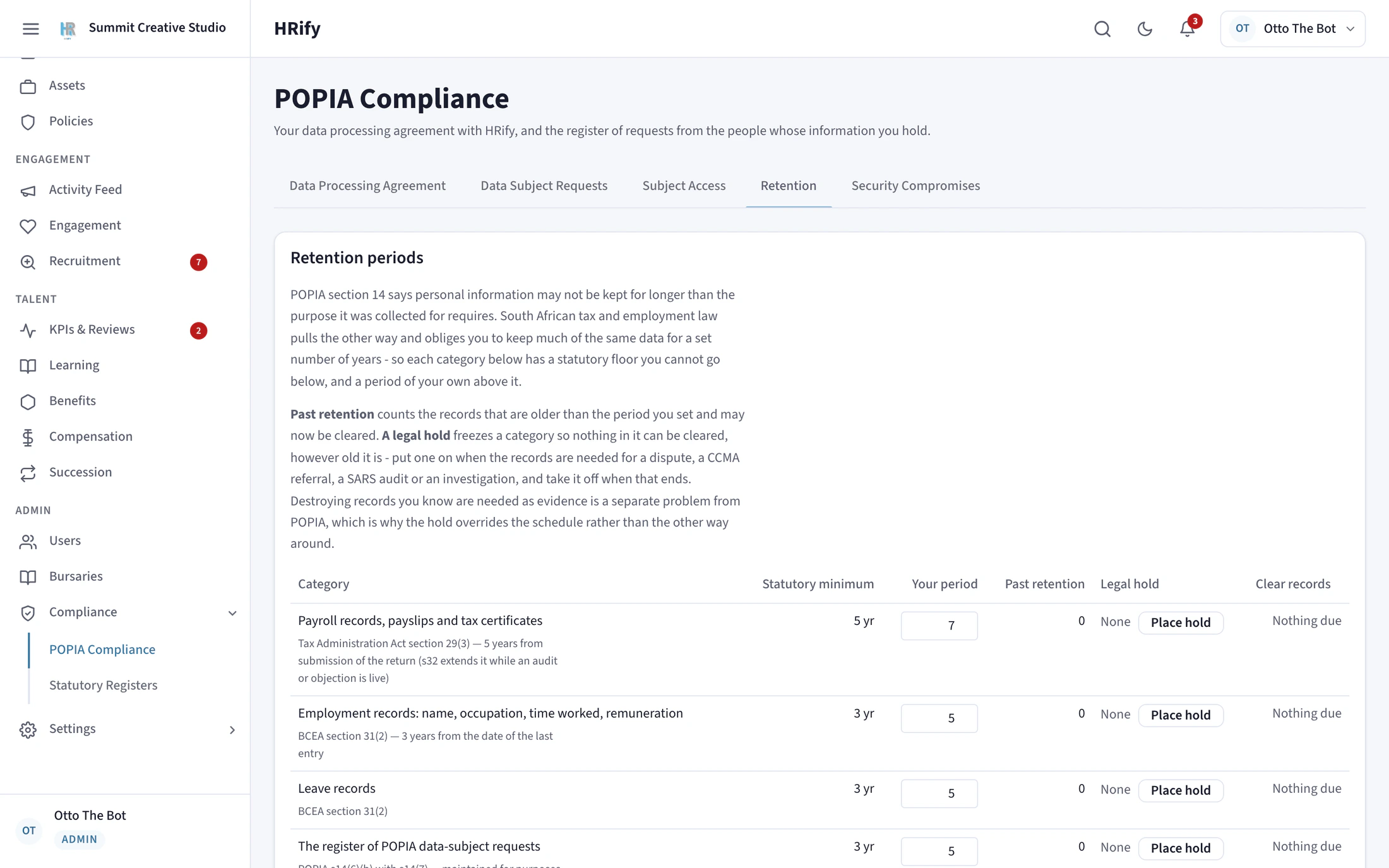
- You set how long each category of record is kept, and HRify will not let you choose a period shorter than the law allows.
- Deleting an employee anonymises their record. Their identity is removed, but the payroll and audit history is kept, because SARS still requires it.
- When someone asks what information you hold about them, HRify builds the export for you and removes any other person’s details from shared records.
Otto, an AI assistant that answers questions about your HR data
Otto is optional. You ask it a question in plain language instead of building a report. Otto reads your live HR data and answers questions about headcount, leave, timesheets, claims, payroll, hiring, training and pending approvals.
- Otto can only answer questions. It cannot change your data, and it cannot approve, edit or delete anything.
- Otto sees only what you are allowed to see. A manager who asks about leave gets answers about their own team, not the whole company. An employee gets answers about themselves only.
- Otto is off until you switch it on. You decide whether to use it. This matters under POPIA, because questions put to Otto are processed outside South Africa, in the United States.
- Some information is never sent to Otto. ID numbers, bank details, employment equity data and medical aid data are excluded, whatever the question.
- Otto can be wrong. Check anything important against the underlying records before you act on it.
Ask about your own company’s data. Otto can read it but cannot change it, and it only shows you what you are already allowed to see.
Your data, and what we do with it
We use a small number of service providers to host HRify and store its data, and we remain responsible for them under section 21 of POPIA. They are listed in our Privacy Policy.
Your data remains yours
You own all the data you enter into HRify. We do not use your employee or client records to improve the product, and we do not use them to train any artificial-intelligence model.
If something goes wrong
If a security breach affects data we process for you, we tell you immediately, and no later than 24 hours after we become aware of it. We give you the information you need to meet your own legal obligations.
When you leave
You can export your data from HRify. If you ask us in writing within 30 days of your subscription ending, we provide an export in a commonly used format.
The details are in the Privacy Policy and section 10 of the Platform Terms of Use. No internet-based service can guarantee absolute security, and we do not claim to.
See HRify with your own payroll figures
Bring the figures for a payroll month you have already run. In the demo, HRify checks each of your employees against SARS rules and shows you what it finds.