HRIFY

Built for South African employment and tax law

International HR software is usually adapted for South Africa by adding a currency symbol and a tax field. HRify was built for South Africa from the start. That is why its leave calculations use the 36-month sick leave cycle, and why it tracks the CCMA deadlines on a disciplinary case.

SARS, BCEA, POPIA and the LRA in HRify

SARS and payroll

Payroll that follows SARS rules

  • HRify produces the e@syFile import file for your tax certificates, and the bulk file for registering employees who do not have a tax number yet.
  • Before you export anything, HRify checks every employee against SARS’s own rules and tells you which employees would fail, and why.
  • HRify produces the monthly EMP201, the EMP501 at reconciliation, and IRP5 and IT3(a) certificates. It also calculates the Employment Tax Incentive (ETI) carry-forward for you.
  • Tax directives, severance, back pay, bursaries, company cars and share schemes are each calculated and taxed by HRify, so nobody has to remember to adjust them by hand.
  • Earnings and deductions are matched to the right SARS source codes. Anything HRify does not cover is listed up front, so nothing is silently left off a certificate.
  • HRify holds the tax tables for two tax years, taken from the Government Gazette. If a figure has not been published yet, payroll stops and does not guess.

HRify produces the file and the figures. You import the file into e@syFile and submit the return yourself.
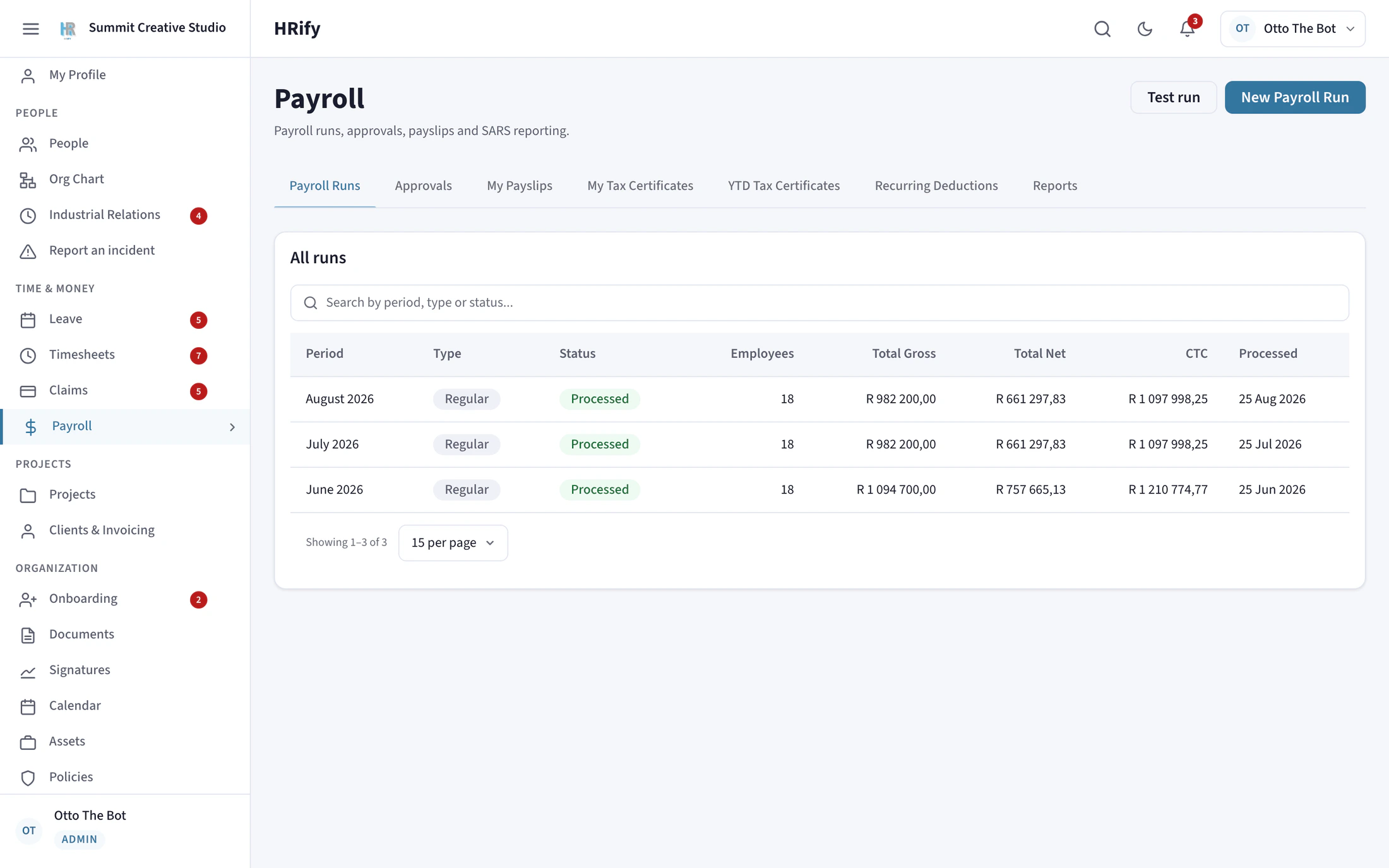
Payroll runs in HRify with gross, net and cost to company per period
Basic Conditions of Employment Act

Leave and working hours that follow the Act

  • Every statutory leave type is included. Sick leave runs on a 36-month cycle counted from each employee’s own start date. It is not reset for the whole company on one date.
  • Carried-over leave expires when the Act says it does, and you cannot pay out more leave than section 20(11) allows.
  • When you approve a timesheet, HRify checks that week against the daily and weekly hour limits, the overtime limit, meal breaks, night work and the earnings threshold, and warns you before you approve.
  • Overtime is paid at 1.5×, and Sundays and public holidays at 2×. An overtime hour worked on a Sunday is paid at 2×, not 3.5×, because the two rates are not added together.
  • Minimum wage is checked against the gazetted figure for that period, not last year’s figure.
  • When someone leaves, the section 42 certificate of service and the UI-19 form are generated from their record.
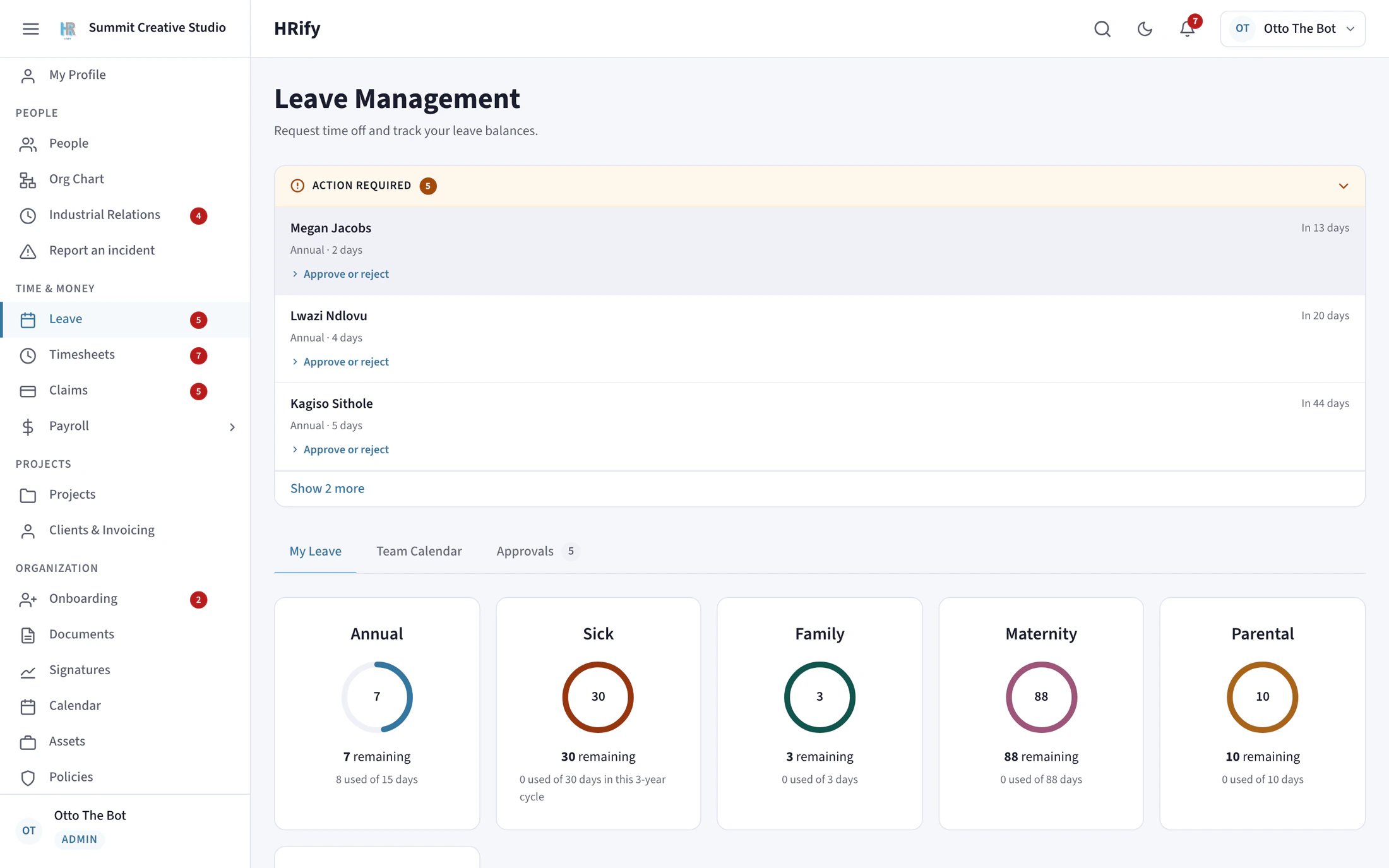
The Leave screen in HRify with requests to approve and leave balances
Protection of Personal Information Act

How HRify protects your employees’ personal information

  • ID, passport and tax numbers, bank account details, medical aid details and signatures are encrypted in the database. They are not just hidden behind a login.
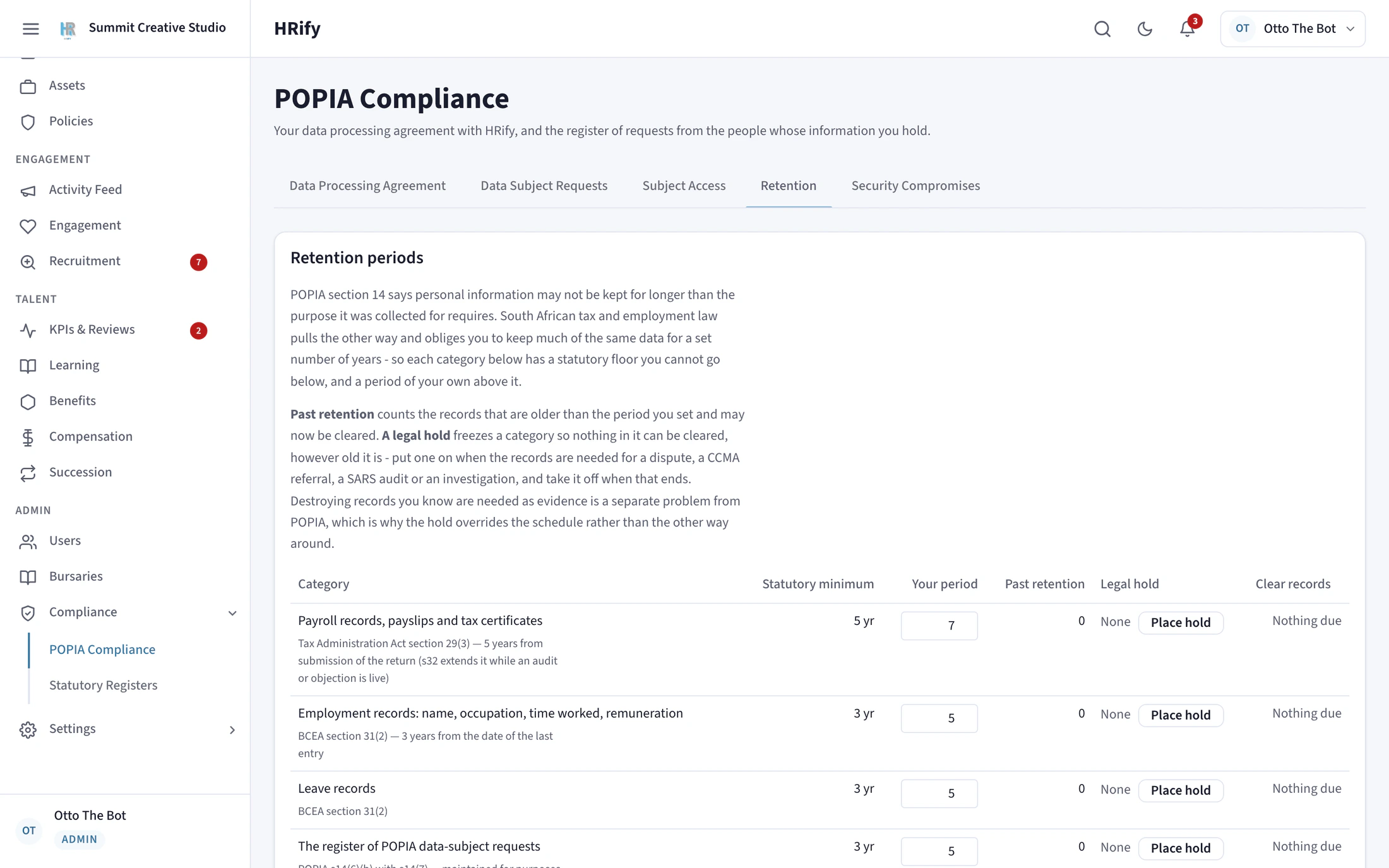
  • You set how long each category of record is kept, and HRify will not let you choose a period shorter than the law allows: five years for tax records, three for BCEA records and four for COIDA records.
  • Deleting an employee anonymises their record. Their identity is removed, but the payroll and audit history is kept, because SARS still requires it.
  • If the law still requires a record to be kept, HRify refuses the deletion and tells you exactly which rule applies and until when.
  • When someone asks what information you hold about them, HRify builds the export for you and removes any other person’s details from shared records.
The HRify POPIA console with retention periods per record category
Labour Relations Act and the CCMA

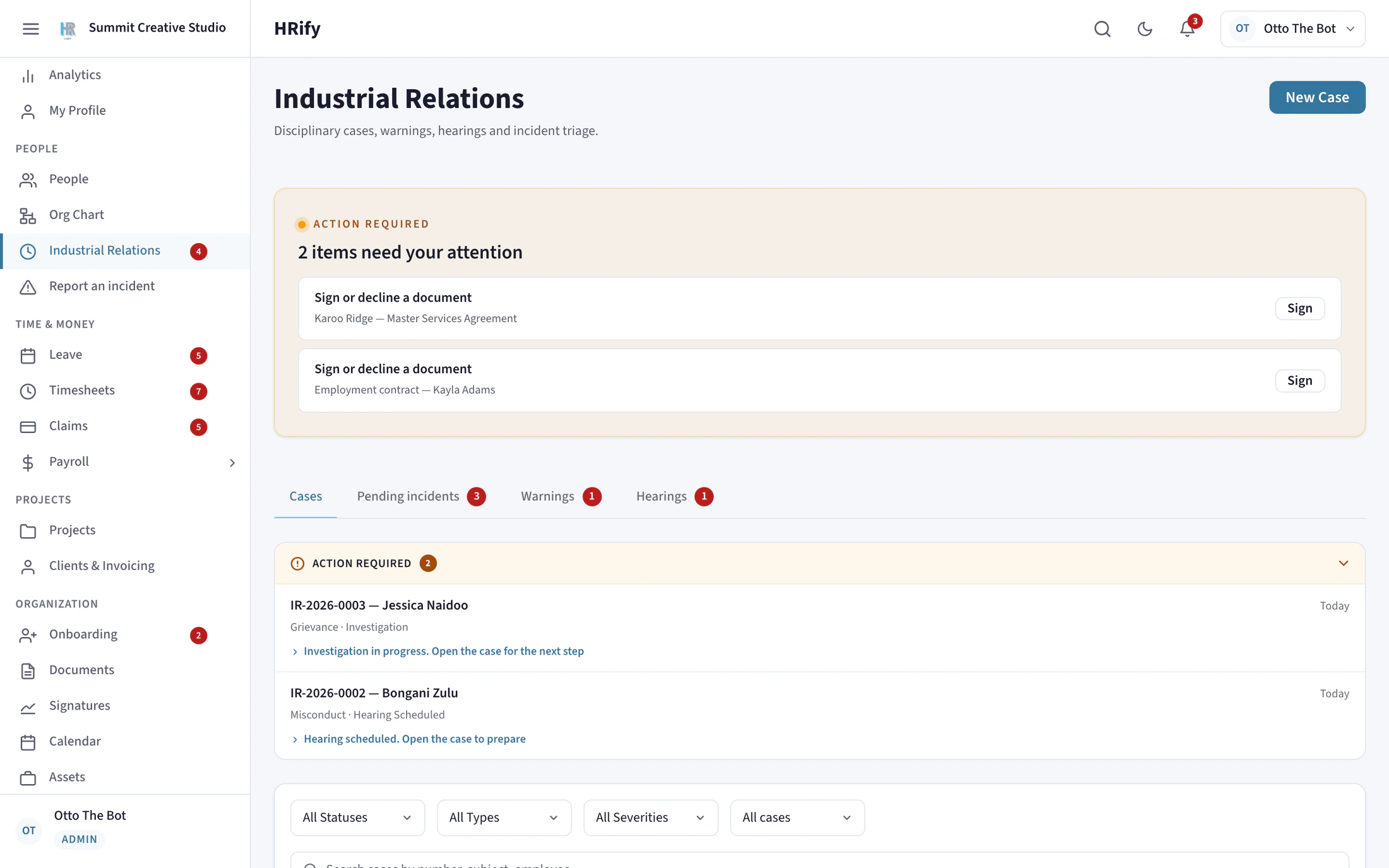
Disciplinary cases, with the CCMA deadlines tracked for you

  • The disciplinary process is built on the 2025 Code of Good Practice on Dismissal, which replaced Schedule 8 in September 2025.
  • You cannot record a dismissal against a case that never had a hearing.
  • The period for referring a dispute to the CCMA is counted from the correct date. For a dismissal on notice it starts when the notice period ends, an internal appeal restarts it, and a deadline that falls on a weekend moves to the next working day.
  • The deadline is thirty days for a dismissal and ninety days for an unfair labour practice. HRify chooses the right deadline based on the outcome of the case.
  • Hearing notices, outcome letters and dismissal letters are generated as signed PDFs from the case itself.
  • Retrenchment follows section 189A. The nine consultation topics are ticked off as you cover them, and the severance due is compared with what you are offering.
The Industrial Relations screen in HRify with disciplinary cases

Mistakes HRify will not let you make

These are six things HRify will stop you from doing. Each one prevents a penalty, a CCMA award or a SARS query.

  • You cannot file a SARS submission that has errors

    HRify lists the employees with errors and the reason for each. You can still run a test export, so you can see the whole list before you fix anything.

  • You cannot run payroll in a new tax year until the new figures are confirmed

    On 1 March, when the tax year starts, HRify shows the figures that have changed and waits for someone to confirm them.

  • You cannot pay a lump sum before the SARS directive arrives

    HRify holds severance and certain other lump-sum payments until the tax directive arrives, so a payment never has to be corrected afterwards.

  • You cannot delete an employee record the law says you must keep

    HRify tells you which records must still be kept and for how long.

  • Nobody can approve their own claim, payroll run or bank-detail change

    This is built in. An administrator cannot switch it off.

  • You cannot issue the same invoice number twice

    The VAT Act requires invoice numbers to be unique, so HRify refuses a duplicate.

What “compliant” means, and what it does not

We want to be clear about what HRify does, and what remains your responsibility.

There is no SARS certification for payroll software

HRify runs payroll to SARS rules and produces the file and the figures. You import the file into e@syFile and submit the return yourself. HRify is not affiliated with or endorsed by SARS.
You remain the employer

HRify calculates from the information you enter and the settings you choose. You review every payroll run, payslip and return before you approve, pay or submit it. Filing and meeting deadlines remain your responsibility.

Software is not professional advice

TJ Software Solutions is not a registered tax practitioner, accountant, auditor or law firm. HRify does not replace your accountant, tax practitioner or labour adviser, and you should keep using them.

Section 17 of the Platform Terms of Use sets out the full position, including what we are responsible for if our calculations are wrong.

See HRify with your own payroll figures

Bring the figures for a payroll month you have already run. In the demo, HRify checks each of your employees against SARS rules and shows you what it finds.